
Best Phones for Seniors in 2026
An in-depth guide to this year’s top amplified and cordless phones for older adults
Staying connected gets more important—not less—as we age. But for many seniors, standard home phones and smartphones are simply too quiet, too small, or too complicated. That’s where amplified and senior-friendly phones shine: they boost volume, simplify controls, and cut down on nuisance calls so older adults can focus on what matters—talking to family, friends, and doctors.
In this guide, we’ve rounded up the best phones for seniors of 2026, from loud cordless systems that blanket a whole house to extra-simple corded models with giant buttons and photo dialing. We focused on sound clarity, amplification, ease of use, safety features, and value, drawing from expert lab tests, buying guides, and hundreds of user reviews.
You’ll find budget-friendly corded phones for basic reliability, mid-range cordless systems that balance simplicity and features, and premium amplified sets aimed specifically at seniors with hearing loss. Along the way, we highlight options for low vision, memory challenges, and families who want multiple handsets spread around the home.
Below, we start with our team’s top picks, then dive into detailed reviews of each phone, followed by buying advice section that explains what to look for (and what to avoid). Even without a comparison table on-screen, you’ll get a clear sense of how these models stack up—and which one will be the best fit in your home.
Best Overall Phone for Seniors
1. Panasonic KX-TGM420W + KX-TGMA44W
Specs (at a glance)
- Type: Amplified cordless phone system with base and extra handsets
- Amplification: High-volume boost with adjustable tone control
- Key Features: Slow-speech playback, visual ringer, large backlit display, long battery life, expandability up to multiple handsets
What we like
- Excellent sound quality and loud, clear amplification
- Intuitive, senior-friendly interface and menus
- Long battery life and impressive range
- Visual call indicators and big, bright display
What we don’t
- Considerably more expensive than budget models
- Some features (like noise reduction) are a bit buried in menus
In Use
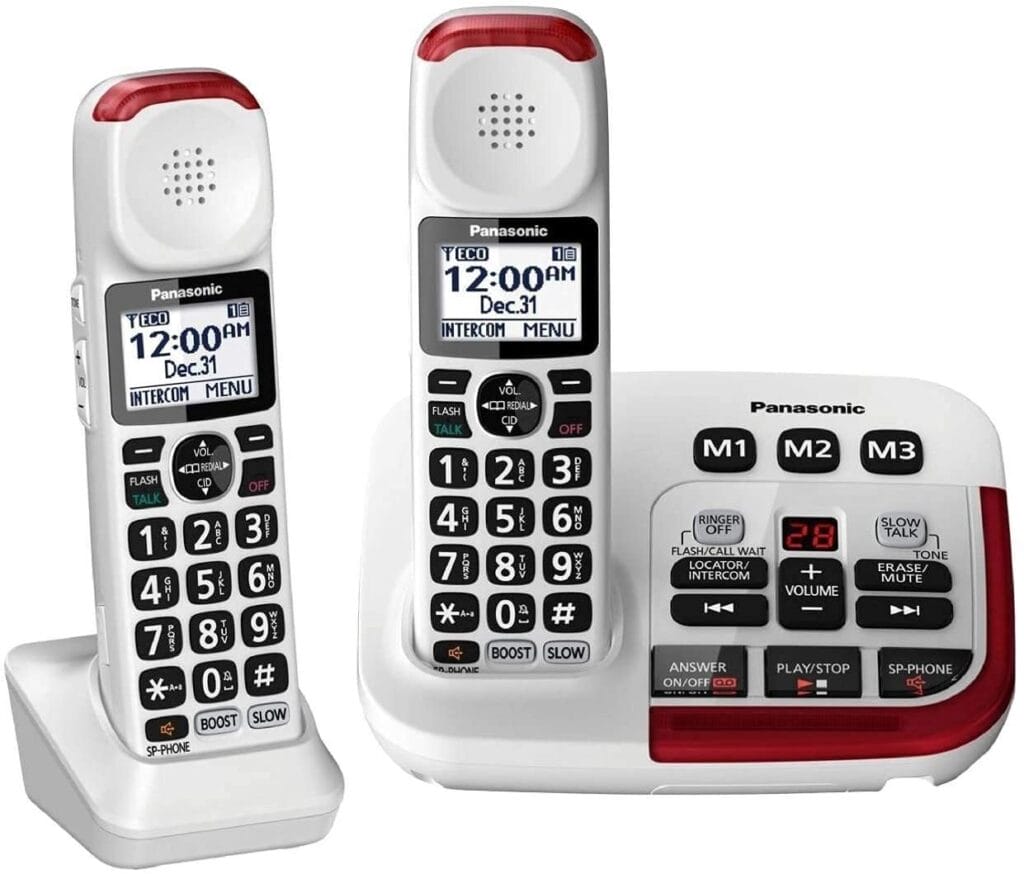
If we had to recommend just one phone system for most older adults, it would be the Panasonic KX-TGM420W with KX-TGMA44W handsets. It combines the loudness and clarity that seniors with mild to moderate hearing loss need with the kind of straightforward interface we rarely see on tech-heavy phones. In testing, call audio is crisp even at high volumes, and the adjustable tone control makes voices easier to understand rather than just louder.
Unlike more basic phones, the Panasonic stands out in the details: the large backlit screen, well-spaced buttons, and clearly labeled menu options make it easy to navigate, even for someone who doesn’t enjoy fiddling with devices. The range is strong enough for most homes, and battery life is measured in days, not hours, which reduces the chance of picking up a dead handset when a call comes in.
Compared with cheaper models like the Panasonic KX-TGD832M, the KX-TGM420W system offers more powerful amplification, better tuning for speech clarity, and more accessibility features (such as slow-speech playback and a visual ringer). Those extras genuinely matter for older adults who struggle to catch every word on the phone.
For seniors with hearing loss who still want a cordless system they can take around the house, this setup hits the sweet spot between usability, performance, and long-term reliability.
Verdict
For its combination of powerful amplification, easy controls, and excellent call clarity, the KX-TGM420W system is our top overall choice for most seniors. It’s not cheap, but if the phone is used daily, the comfort and confidence it provides are worth the price.
Best Phone for Safety and Call Blocking
2. VTech SN5147
Specs (At a glance)
- Type: Amplified corded/cordless combo with answering machine
- Amplification: Up to 50 dB with one-touch Audio Assist
- Key Features: Smart call blocker, photo dial buttons, 90 dB extra-loud visual ringer, answering machine
What we like
- Powerful ringer and handset volume for those who miss calls
- Photo dial buttons simplify calling key contacts
- Smart call blocker drastically cuts robocalls and scams
- Audio Assist button boosts and clarifies speech on demand
What we don’t
- Setup and call-blocker menus can be confusing at first
- Corded base limits placement if the wall jack is in a bad spot
In Use
The VTech SN5147 is tailored for older adults who need both loud volume and extra safety features. The 90 dB visual ringer is among the loudest we’ve seen—great for larger homes or seniors who frequently miss calls. One-touch Audio Assist is surprisingly effective: tap the button during a call, and voices jump in volume and clarity without becoming harsh.
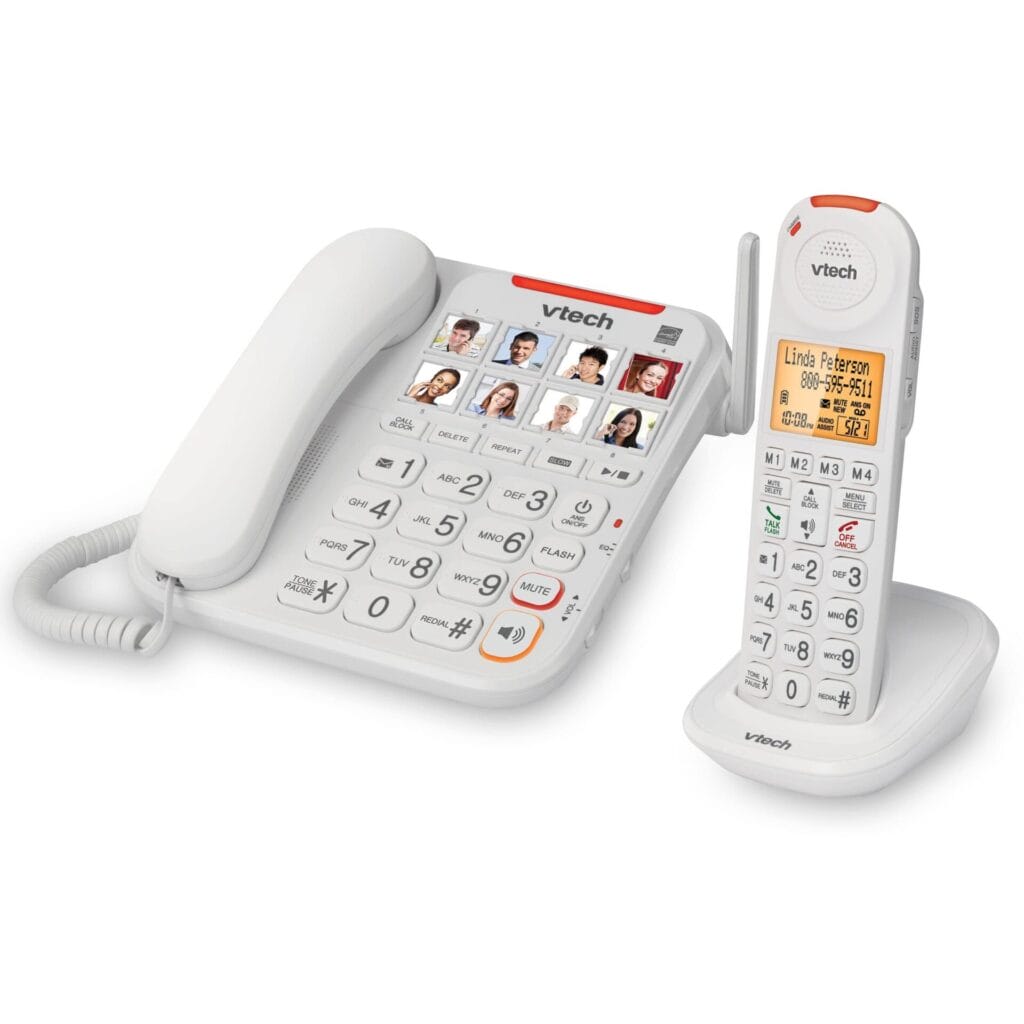
What sets the SN5147 apart is its photo dial feature and Smart Call Blocker. The photo dial buttons on the base let you assign family members or caregivers to picture keys, which is incredibly helpful for low-vision seniors or those with mild cognitive impairment. Meanwhile, the call blocker screens unknown calls and dramatically reduces robocalls and telemarketers, which are a known scam vector for older adults.
Compared with the more premium Panasonic KX-TGM420W, the VTech SN5147 is a bit less refined in pure audio quality and interface polish. But it fights back with stronger spam protection and the photo dial system, which many families value even more than a slightly cleaner sound profile.
We did note that some users find the menus and call-blocking rules awkward at first, and the base unit needs to live near the phone jack. Once configured, though, it becomes a powerful tool for both communication and protection.
Verdict
If you’re especially worried about robocalls, scams, and missed calls, the VTech SN5147 is a standout pick. It’s a fantastic choice for seniors with hearing loss who also benefit from visual cues and quick-access photo dialling.
Best Value Cordless System
3. Panasonic KX-TGD832M
Specs (at a glance)
- Type: Standard cordless phone system with answering machine
- Amplification: Moderate; suitable for mild hearing loss
- Key Features: Long range (~360 ft), speed dial, call blocking, silent hours, expandable to six handsets
What we like
- Excellent sound quality and range for the price
- Clear, easy-to-read screen and button labels
- Effective call blocking and “quiet time” options
- Expandable system supports up to six handsets
What we don’t
- No direct link to cell phones
- Speakerphone can echo slightly when handset lies flat
- Voicemail can only be erased from the base
In Use
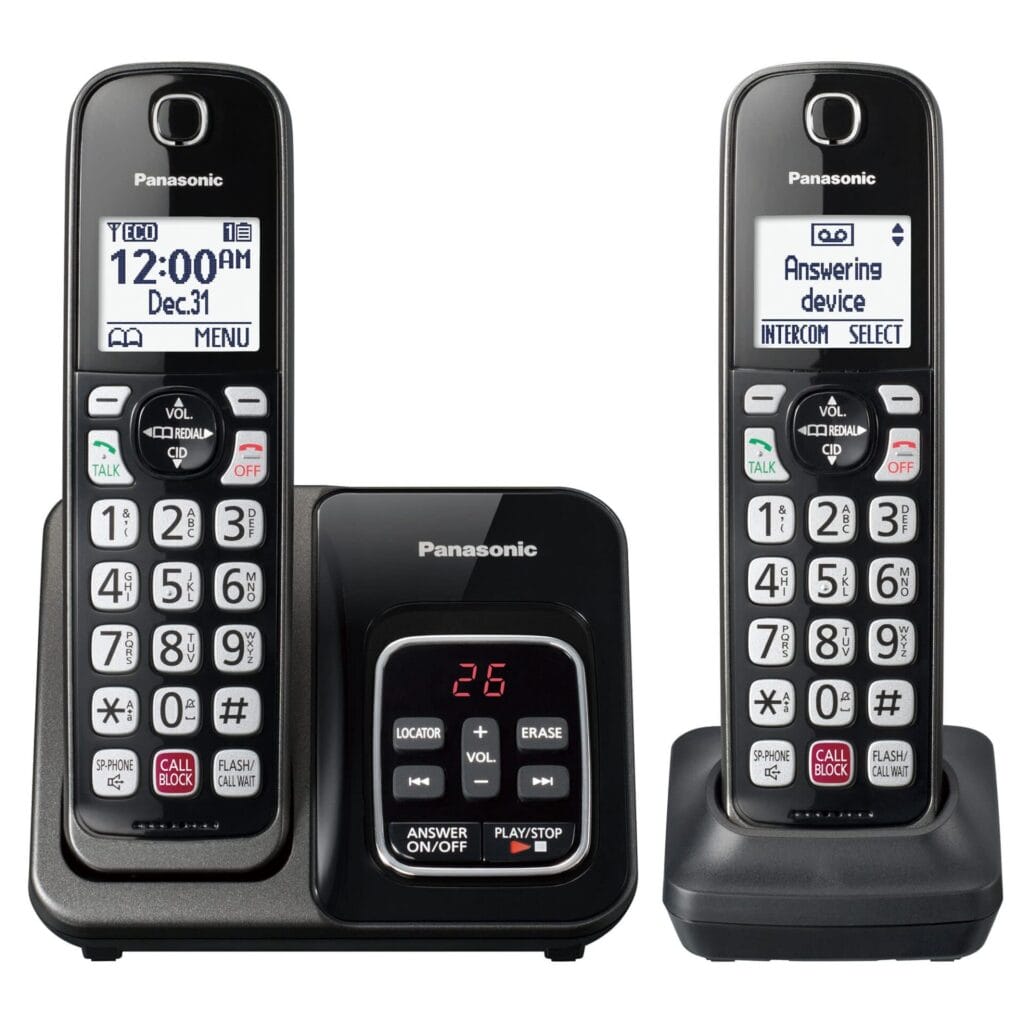
The Panasonic KX-TGD832M is our favorite value cordless phone for seniors who don’t need maximum amplification but still want a reliable, user-friendly system. Sound quality is impressively crisp, and the range easily covers a standard home, so you can wander between rooms without losing the call.
Where the KX-TGD832M shines for seniors is in its simple interface: big, legible text; intuitive buttons; and useful touches like “silent hours” to keep the phone from ringing at night. Call-blocking tools are less aggressive and customizable than those on the VTech SN5147 but still do a good job of trimming nuisance calls.
Compared with the premium KX-TGM420W, you lose some hearing-focused features like tone adjustment and slow-speech playback, but you keep the core Panasonic build quality and ease of use at a much lower price. For seniors with normal hearing or only mild loss, that trade-off is worth considering.
Verdict
If you want a no-fuss cordless phone with great clarity and range at a reasonable price, the Panasonic KX-TGD832M is hard to beat. It’s ideal for older adults who value straightforward design and don’t need heavy-duty amplification.
Best Budget Big-Button Phone For Seniors
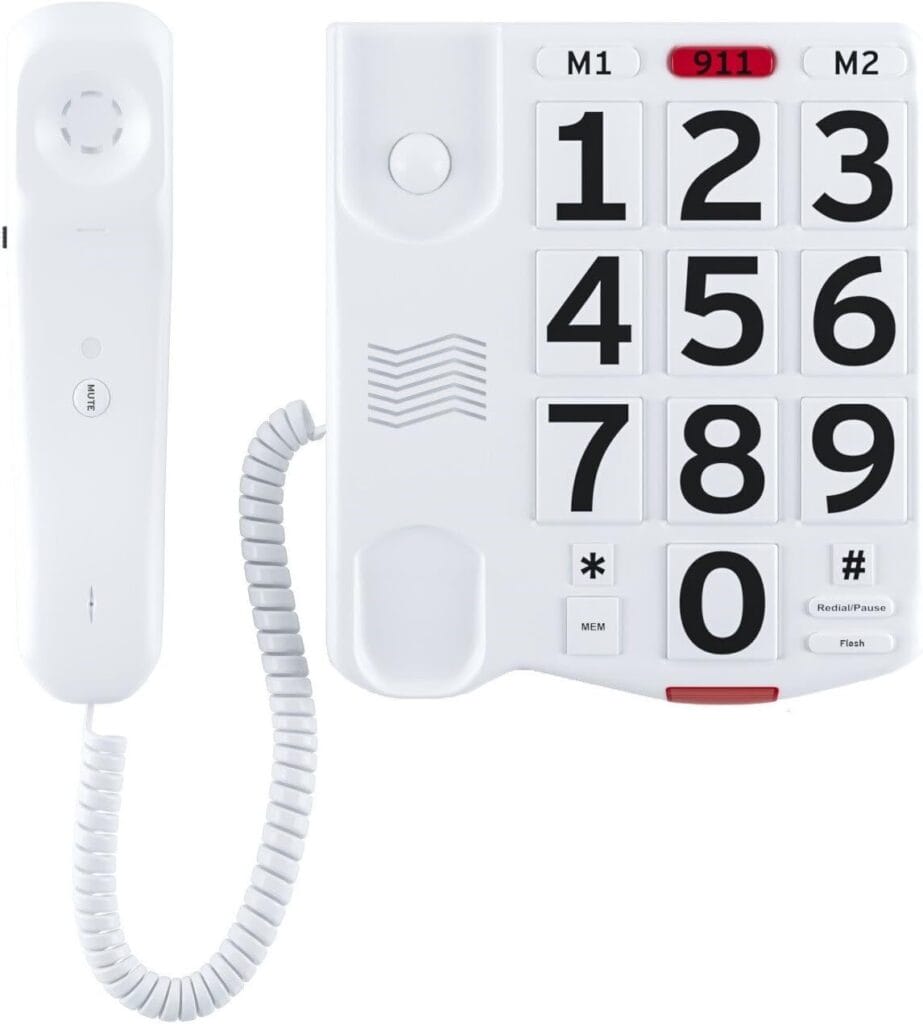
4. Big Button Phone (Amazon)
Specs (at a glance)
- Type: Corded landline phone
- Amplification: Louder-than-average ringer and handset
- Key Features: Extra-large buttons, loud ringer, flashing light alerts, memory buttons, no external power required
What we like
- Very large, high-contrast buttons for low vision
- Works even during power outages (no AC power needed)
- Memory keys make calling family fast and simple
- Extremely affordable and purpose-built for seniors
What we don’t
- No speakerphone function
- Corded design limits how far you can move while talking
- Very basic feature set—no call blocking or cordless handsets
In Use
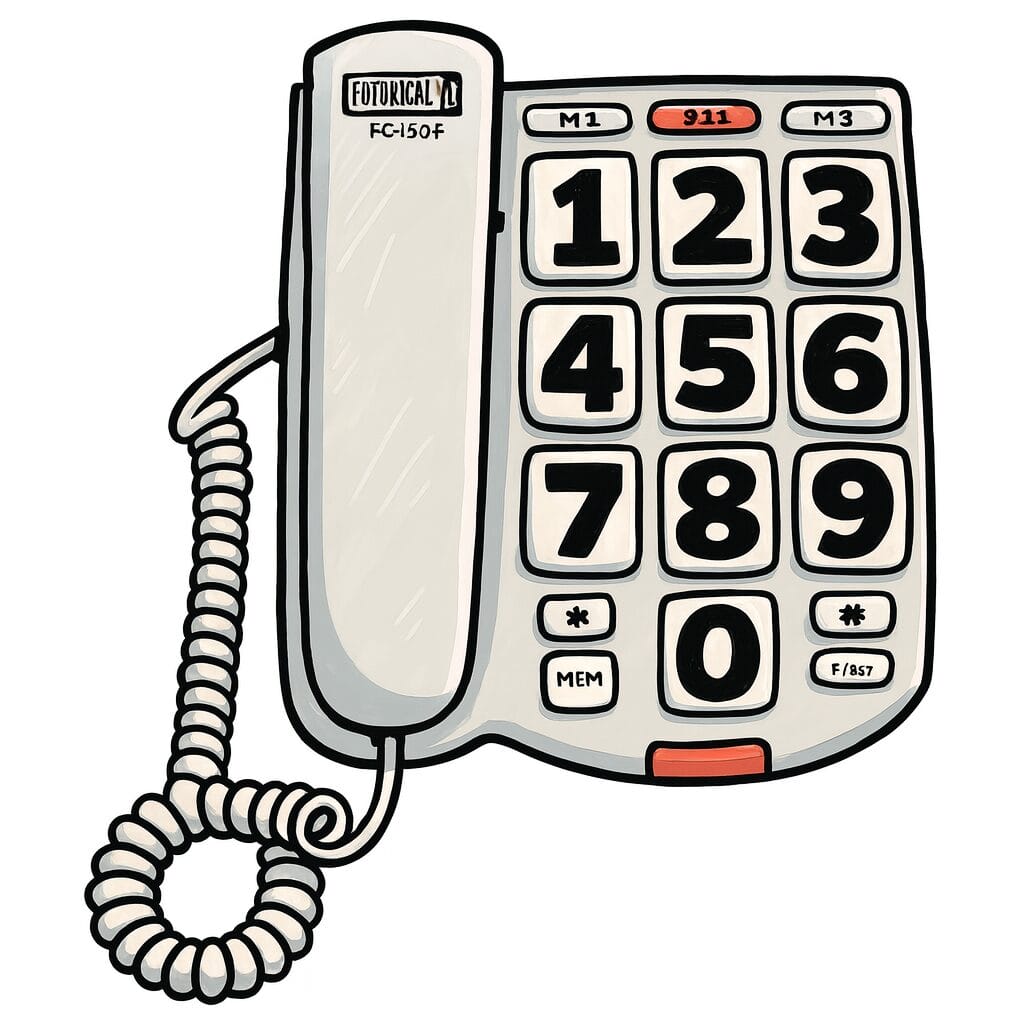
For seniors who just want a simple, fail-safe phone by the bedside or in the kitchen, this Large Button Phone for Seniors gets the basics right. The oversized buttons are easy to see and press, even for users with poor eyesight or arthritis. A loud ringer and flashing light help ensure calls aren’t missed, and the phone’s memory buttons make it easy to call family or emergency contacts without dialing full numbers.
Unlike every cordless system on this list, this model doesn’t rely on a power adapter: it draws power from the phone line itself. That means it keeps working during power outages, which can be a big deal for older adults living in storm-prone areas or alone.
Of course, you sacrifice convenience. There’s no speakerphone, no call blocking, and you’re tethered to the cord during calls. Compared with the VTech SN5147 or Panasonic cordless models, it’s downright spartan. But that’s exactly what many families want for a backup line or a single “always works” phone in a central location.
Verdict
If budget is tight or you simply want a reliable, extremely easy-to-see landline, this large-button corded phone is a great value. It pairs nicely with a more advanced cordless system elsewhere in the house.
Best Simple Combo for Low Vision
5. VTech SN5127
Specs (at a glance)
- Type: Corded/cordless phone system
- Amplification: Adjustable volume suitable for hearing-impaired users
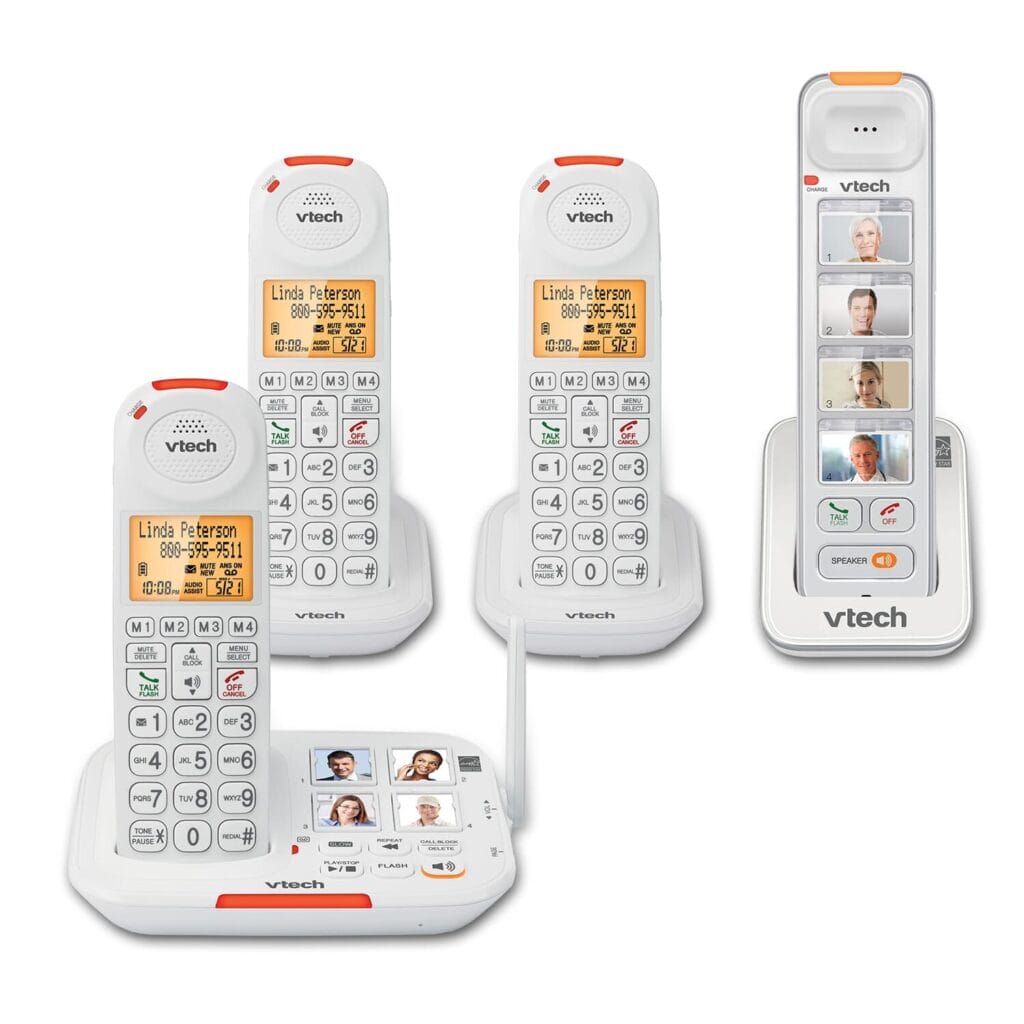
- Key Features: Picture dial buttons, loud ringer, easy access to important numbers, corded base plus cordless handset
What we like
- Picture dial buttons make calling family almost foolproof
- Corded base can’t be misplaced and works as a reliable “home base”
- Loud ringer and clear speakerphone quality
- Written instructions are clearer than many competitors
What we don’t
- Cordless handset has a lot of buttons that may intimidate some seniors
- Call block button can be pressed accidentally
- Accessory handset has fewer features and a shorter battery life
In Use
The VTech SN5127 is designed for seniors who want something simpler than a full-featured cordless system but more flexible than a basic corded phone. The corded base is the star here: it stays put, offers large buttons, and includes picture dialing so loved ones can be called by pressing a face, not a number.
During use, the loud ringer and clear audio make it easy to hear incoming calls, and the base handset delivers good clarity even at higher volumes. For caregivers, being able to program important contacts into picture buttons is a big win, especially for seniors with low vision or early-stage memory challenges.
That said, the cordless handset is more complex than we’d like, with extra buttons and functions that some older adults will never use. A few reviewers also note that the call-block button can be pressed by mistake, which can lead to confusion if a regular contact suddenly can’t get through.
Compared with the SN5147, the SN5127 feels a little less “feature-loaded” but also more approachable for seniors who mostly use the corded base. Think of it as a great choice when simplicity and picture dialing matter more than advanced call blocking.
Verdict
For seniors who primarily use one phone location but want the flexibility of a cordless handset, the VTech SN5127 hits a nice balance of simplicity, loudness, and low-vision accessibility.
Best of the Rest
6. Panasonic KX-TDG863W
Specs (at a glance)
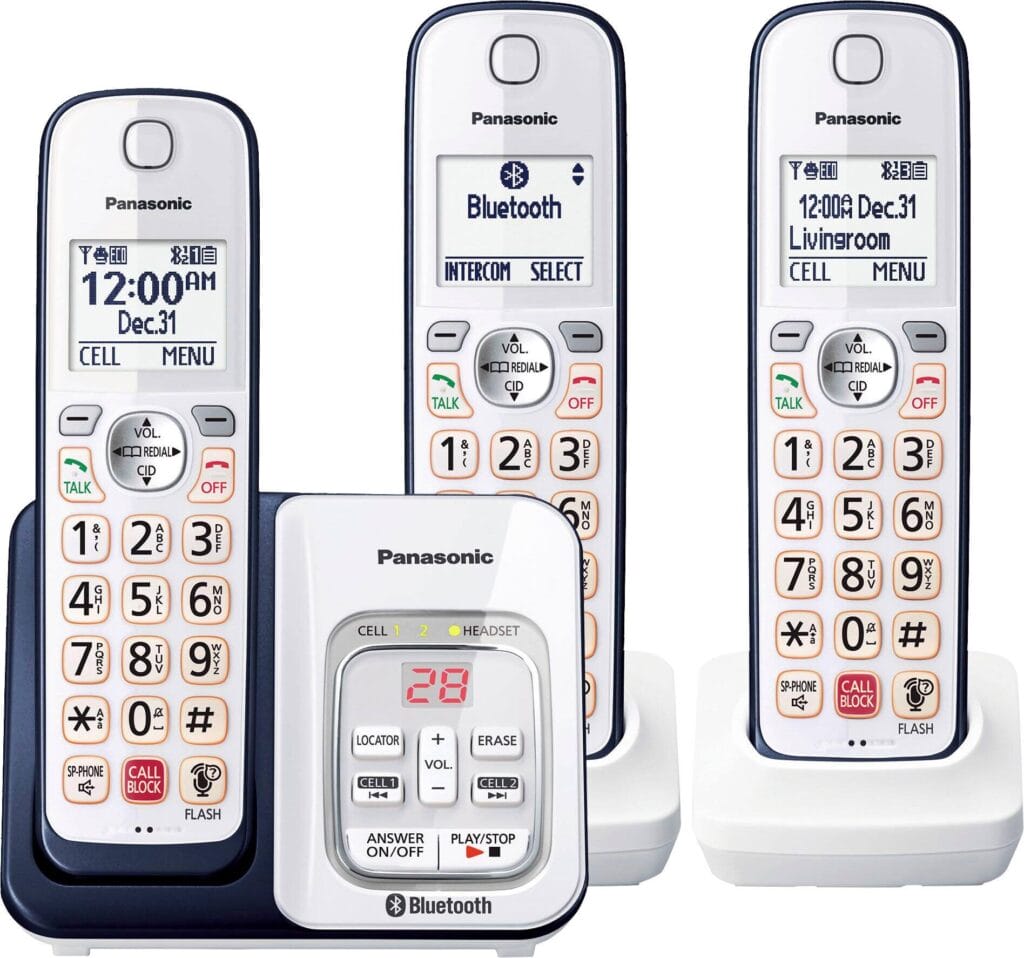
- Type: Cordless phone system with Bluetooth and answering machine
- Amplification: Good volume with hearing-aid compatibility
- Key Features: Pairs with two smartphones via Bluetooth, automated call blocking, bilingual talking caller ID, intercom
What we like
- Can pair with smartphones for seamless call handling
- Built-in call blocking and talking caller ID improve safety
- Works with hearing aids and includes helpful accessibility features
- System is expandable up to multiple handsets for larger homes
What we don’t
- Extra features add cost and complexity
- Overkill for seniors who just want a basic home phone
In Use
The Panasonic KX-TDG863W is our pick for tech-comfortable seniors or families who want a home phone that works alongside smartphones. With Bluetooth pairing for up to two mobile devices, you can answer cell calls on the home handsets, which is great for older adults who don’t always hear or find their smartphone in time.
The system also includes automated call blocking and bilingual talking caller ID, making it easier to screen calls and understand who’s on the line. Hearing-aid compatibility and solid volume levels mean it still works well for seniors with mild hearing loss, even if it isn’t a true “amplified” phone like the KX-TGM420W.
Compared to simpler systems like the KX-TGD832M, the KX-TDG863W is a feature-rich platform with a bit more to learn. But if you or a family member can take the time to configure call blocking, smartphone pairing, and intercom functions, it can reduce missed calls and streamline communication across the household.
Verdict
For seniors who use smartphones but still want a traditional handset that rings loudly in every room, the Panasonic KX-TDG863W is a smart, forward-looking choice that blends mobile and landline worlds.
Buying Advice – How to Choose the Best Phone for Seniors
Amplification and Sound Quality
For many older adults, sound quality is the number-one feature. Look for:
- Amplified volume options: Some phones boost incoming audio by 30–50 dB, making them much louder than standard phones.
- Tone control: Being able to adjust treble and bass can make speech easier to understand, especially for high-frequency hearing loss.
- Hearing-aid compatibility: Look for models that explicitly mention this, so you avoid feedback and muffled sound.
If hearing loss is a primary concern, systems like the Panasonic KX-TGM420W or VTech SN5147 stand out from vanilla cordless options.
Corded vs. Cordless vs. Combo
Each style has its strengths:
- Corded phones (like the Large Button Phone for Seniors):
- Work during power outages
- Almost impossible to misplace
- Great as a “backup” or primary bedside phone
- Cordless phones (like the KX-TGD832M):
- Let seniors move freely around the home
- Can be expanded with multiple handsets
- Best if placed in frequently used rooms
- Corded/cordless combos (VTech SN5147, SN5127):
- Offer a reliable, always-there corded base
- Add flexibility of cordless handsets for convenience
- Often include extra senior-focused features like photo dialing
For most households, we like a combo setup: one solid corded base in a central location plus cordless handsets in bedrooms or the living room.
Ease of Use and Accessibility
The best phone for seniors should be intuitive on day one and still manageable in a year. Key things to check:
- Button size and contrast: Large, high-contrast buttons reduce mis-dials and help those with low vision.
- Display readability: Backlit displays with clear fonts are easier to see, day or night.
- Picture dialing: Photo keys can be a game changer for seniors with memory issues—just press “daughter” instead of remembering her number.
- Menu simplicity: Fewer layers of menus, clearly labeled keys, and straightforward instructions matter more than fancy extras.
If a phone looks overwhelming, it probably is. Favor devices that present only what’s necessary on the surface and tuck advanced options into the menu.
Call Blocking and Safety Features
Robocalls, spam, and scams target older adults at high rates, so call blocking is genuinely a safety feature. Look for:
- Built-in spam filters or smart call blockers that screen unknown numbers by default
- Easy-to-use block buttons for adding new nuisances to the list
- SOS or emergency buttons for quickly reaching pre-programmed contacts
- Visual ringers and loud alerts so important calls aren’t missed
Phones like the VTech SN5147 and Panasonic KX-TDG863W include strong call-blocking and caller ID tools that reduce stress and confusion.
Number of Handsets & Home Layout
Before buying, think about where your senior actually talks on the phone:
- A small apartment may only need a single handset or a corded phone.
- A multi-level home benefits from two to four handsets, especially if mobility is limited.
- Look for systems that are expandable so you can add more handsets later without buying a new base.
Panasonic’s cordless systems, in particular, tend to allow expansion up to six handsets, which is more than enough for most families.
Budget: What You Get at Each Price Point
- Under $40:
- Basic corded phones with large buttons and loud ringers
- Minimal extras, no call blocking, no cordless convenience
- $50–$120 (Value to Mid-Range):
- Cordless systems with multiple handsets
- Solid sound quality, some call-blocking, better displays
- Good all-around choice for seniors with mild hearing needs
- $120–$350 (Premium & Amplified):
- Heavy-duty amplification and tone control
- Advanced call blocking, visual ringers, smartphone pairing
- Best choice for seniors with moderate hearing loss or complex home setups
For many families, a $50–$120 cordless system plus a $30 corded backup hits an excellent balance of reliability and cost.
Common Mistakes to Avoid
- Ignoring hearing needs: Choosing a standard phone when a senior really needs amplification leads to frustration and missed calls.
- Overbuying on features: Extra Bluetooth, intercom, and smartphone integration are wasted if no one uses them—and they make the phone harder to learn.
- Forgetting about power outages: Relying only on cordless phones that die when the electricity goes out can be risky for someone living alone.
- Underestimating scam calls: Skipping call-blocking features leaves seniors exposed to a constant stream of robocalls and potential fraud attempts.
Take a few minutes upfront to match the phone’s complexity and capabilities to the user’s preferences, not just to what looks fancy on the box.
Final Thoughts
There’s no single “best” phone for every older adult—but there is usually a best match for your situation. If hearing loss is your main concern, an amplified system like the Panasonic KX-TGM420W or VTech SN5147 is worth the investment. If simplicity and reliability matter more, a large-button corded phone may be the safest and easiest choice.
In many homes, the winning setup is a hybrid: a powerful amplified or value cordless system around the house, backed up by a simple corded big-button phone that always works and is easy to find. Whichever path you choose, prioritize clear sound, easy operation, and protection from nuisance calls, and you’ll give the senior in your life a phone that feels like a help—not a hurdle.
FAQ’s
- What is the best phone for seniors with hearing loss? For moderate hearing loss, amplified systems like the Panasonic KX-TGM420W or VTech SN5147 are excellent choices because they offer strong volume boost, tone control, and features like visual ringers and slow-speech playback.
- Do corded phones still make sense for seniors? Yes. Corded phones with big buttons are simple, hard to misplace, and often work during power outages, making them ideal as a backup or main phone for seniors who stay mostly in one room.
- How many handsets should I buy for an older adult’s home? In a small apartment, one or two handsets is usually enough. In larger or multi-level homes, aim for three to four handsets: bedroom, living room, kitchen, and near the main entrance, so calls are always within reach.
- Are smartphones better than landline phones for seniors? Smartphones can be great for tech-savvy seniors, but they’re easy to misplace and often quieter. A senior-friendly landline or cordless system with loud audio and big buttons is still the better everyday solution for many older adults.
- What features should I prioritize when buying a senior phone? Focus on sound clarity and amplification, big buttons, a clear display, call-blocking tools, and the right balance between corded and cordless use for the home’s layout.
Sources
- Best Cordless Phones for Seniors – BestReviews.guide https://www.bestreviews.guide/cordless-phones-for-seniors
- The Best Amplified Phones for Seniors – Sarabec https://www.sarabec.com/news/the-best-amplified-phones-for-seniors
- The Best Cordless Phone – Wirecutter (The New York Times) https://www.nytimes.com/wirecutter/reviews/best-cordless-phone/
- Best Cordless Phones – TechGearLab https://www.techgearlab.com/topics/electronics/best-cordless-phone
- Best Cordless Phone: Buying Advice – TechGearLab https://www.techgearlab.com/topics/electronics/best-cordless-phone/buying-advice
- Panasonic KX-TGM420W + KX-TGMA44W Review – TechGearLab https://www.techgearlab.com/reviews/electronics/cordless-phone/panasonic-kx-tgm420w-plus-kx-tgma44w
- Best Cordless Phones – Popular Mechanics https://www.popularmechanics.com/technology/g61975357/best-cordless-phones/
- Best Cell Phones for Hearing-Impaired Seniors – SeniorLiving.org https://www.seniorliving.org/cell-phone/best/hearing-impaired/
- “Best Phone for Hard of Hearing?” – r/hardofhearing (Reddit Discussion) https://www.reddit.com/r/hardofhearing/comments/y1p14o/best_phone_for_hard_of_hearing/
- VTech SN5147 Amplified Corded/Cordless Phone – Amazon Product Page https://www.amazon.com/dp/B07C4WX72D
- VTech SN5147 User Reviews – Amazon https://www.amazon.com/product-reviews/B07C4WX72D/
- Large Button Phone for Seniors – Amazon Product Page https://www.amazon.com/dp/B0CN7D13DS


