
Best Medical Alert Systems of 2026
An in-depth guide to the year’s top medical alert systems, from budget-friendly in-home units to full-featured mobile smartwatches
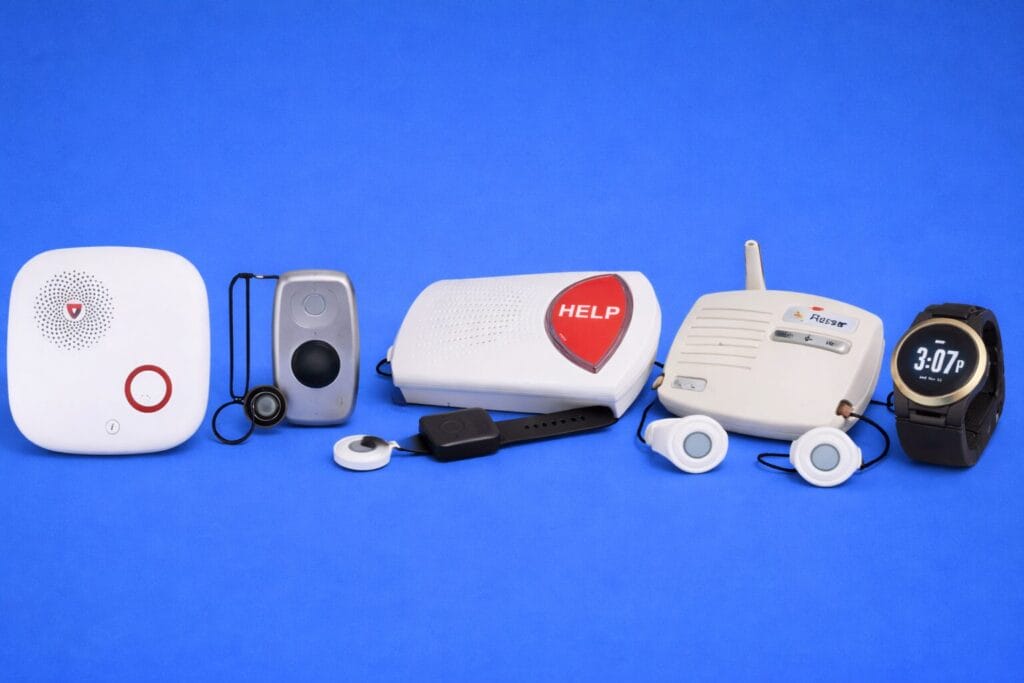
A medical alert system is one of the most consequential purchases you can make for an aging parent or for yourself as you get older. These devices provide a direct, reliable lifeline to emergency help—typically through a wearable button that connects the wearer to a 24/7 professional monitoring center at the press of a button. For the roughly one in four adults over 65 who experience a fall each year, having immediate access to trained dispatchers can be the difference between a brief scare and a life-threatening emergency. And beyond falls, medical alert systems provide peace of mind for everything from sudden vertigo and cardiac events to simply needing a reassuring voice when something feels off.
Choosing the right system, however, is far more complicated than it used to be. Today’s medical alert market includes traditional in-home base stations, compact mobile GPS devices, and even smartwatches that look virtually indistinguishable from consumer wearables. Some systems are landline-based, others rely on cellular networks. Fall detection may or may not be included. Pricing models range from simple monthly subscriptions to complex arrangements involving equipment fees, activation charges, and long-term contracts. Our team spent weeks evaluating the most popular systems on the market, testing response times, assessing fall detection reliability, comparing pricing transparency, and considering real-world usability for older adults with varying levels of dexterity and tech comfort.
In this guide, we cover five standout systems that span the full range of needs and budgets. Whether you’re looking for the most feature-rich option with a caregiver app, the most affordable no-frills system, or a discreet smartwatch that doesn’t look like a medical device, we’ve identified the best pick for each scenario. We also include a thorough buyer’s guide below the reviews to help you understand the key differences between system types, what to look for in fall detection, how to evaluate pricing, and how to avoid common pitfalls that trip up first-time buyers.
Editor’s Note: Prices and features are current as of our most recent review update. Monthly rates may vary depending on your chosen payment plan and optional add-ons.
Our Team’s Medical Alert System Picks
Best Overall Medical Alert System: Medical Guardian
Best Value for Seniors on a Budget: MobileHelp
Best for Couples and In-Home Satisfaction: Bay Alarm Medical
Best Trusted Legacy System for Caregivers: Lifeline (formerly Philips Lifeline)
Best Smartwatch-Style Alert for Active Seniors: UnaliWear Kanega Watch
Best Overall Medical Alert System
#1. Medical Guardian (from $31.95/mo)
Monthly Cost: $31.95–$46.95 (discounts for quarterly and annual plans)
Equipment Fee: $149.95–$199.95 one-time
System Types: In-home (landline and cellular), mobile GPS, smartwatch
Fall Detection: Optional add-on, $10/mo
Contract: No long-term contract required
Key Features: Caregiver app, two-way audio, GPS tracking, Smart Voice Assist, medication reminders
What we like:
One of the fastest average response times in our research, connecting to live agents in roughly 20–29 seconds
Widest selection of device types—five systems covering every lifestyle from homebound to highly active
Excellent caregiver app (MyGuardian) with location tracking, call logs, and medication reminders
Transparent, no-activation-fee pricing with flexible month-to-month billing
What we don’t:
Higher starting price than budget competitors like MobileHelp and Bay Alarm Medical
One-time equipment fees of $149–$199 on top of monthly monitoring, which can be a barrier for some families
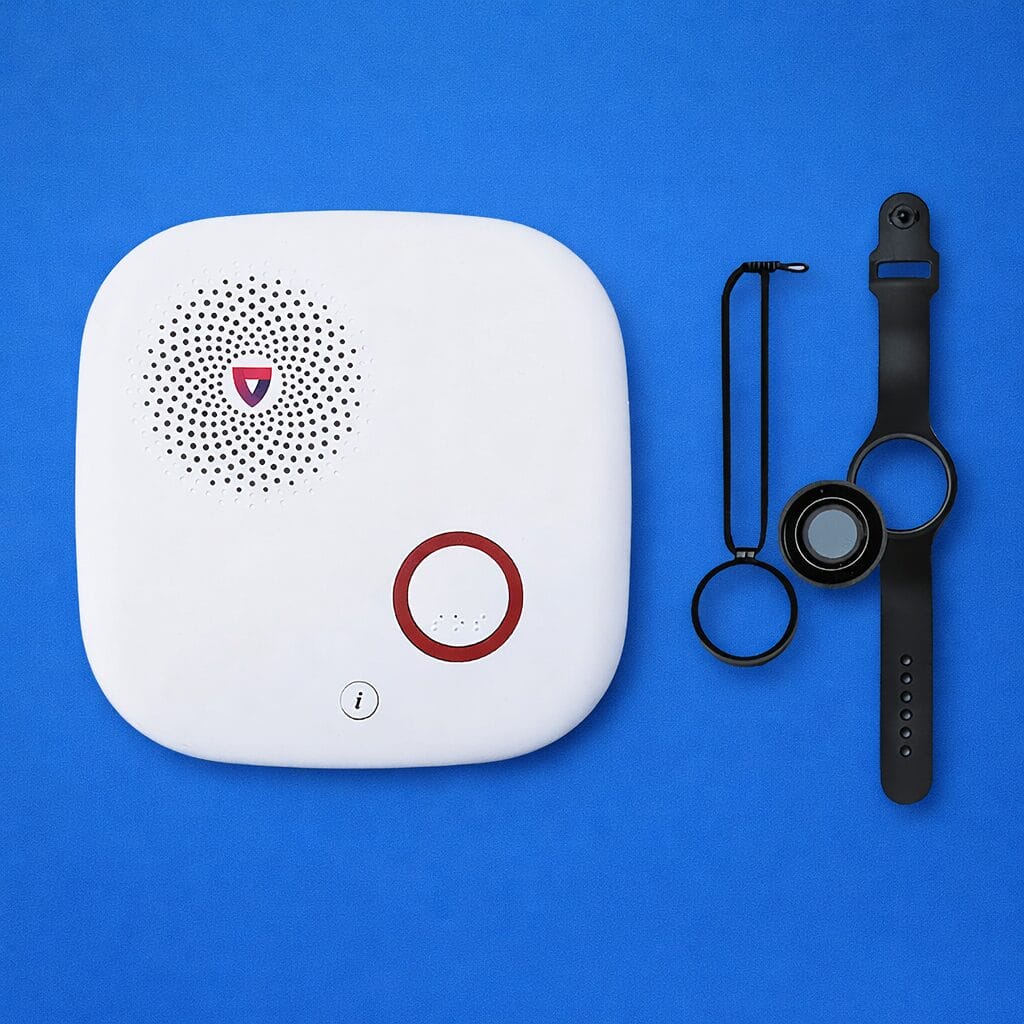
Medical Guardian earned our top overall pick because it delivers the best combination of fast emergency response, diverse system options, and caregiver-friendly features. The company offers five distinct devices—from the basic MGHome Landline for seniors who rarely leave the house, to the MGMove smartwatch for active older adults who want discreet protection on the go. This breadth of choice means you can find the right fit regardless of your parents’ lifestyle, and upgrade or change systems later without switching companies.
In real-world testing conducted by multiple independent reviewers, Medical Guardian’s devices consistently connected to live monitoring agents in under 30 seconds. The MGMove smartwatch was notably fast, often connecting in around 20 seconds. Response speed matters enormously in a medical emergency—every second counts during the “golden hour” after a fall—and Medical Guardian’s monitoring center performance is among the strongest in the industry.
The MyGuardian caregiver app is another significant differentiator. If you’re an adult child living in a different city from your aging parent, this app lets you check your parent’s device location, review emergency call history, monitor battery levels, and even set medication reminders. Reviewers at U.S. News specifically recognized Medical Guardian as the best system for caregivers because of these remote monitoring capabilities. Compared to Bay Alarm Medical’s caregiver app, which covers the basics, Medical Guardian’s app feels more like a comprehensive care management tool.
The downside is cost. Medical Guardian’s in-home cellular system starts at $38.95 per month—about $14 more per month than MobileHelp’s comparable offering. Add the $149.95 equipment fee and optional $10-per-month fall detection, and the first-year cost can add up quickly. Medical Guardian also doesn’t offer a free trial period, unlike Bay Alarm Medical (15 days) and MobileHelp (30 days). For families on a tight budget, this may be a meaningful trade-off.
That said, we believe the faster response times, broader device selection, and superior caregiver features justify the premium for most families. If you want a medical alert system that grows with your parents’ changing needs and gives you the most tools for long-distance caregiving, Medical Guardian is the one to beat.
See the Medical Guardian on their website or on Amazon
Best Value for Seniors on a Budget
#2. MobileHelp (from $24.95/mo)
Monthly Cost: $24.95–$49.95
Equipment Fee: None (equipment is leased)
System Types: In-home (landline and cellular), mobile GPS, bundled dual-user systems
Fall Detection: Optional add-on, $11/mo (often discounted to $5.50 for first billing cycle)
Contract: No long-term contract required
Key Features: Lifetime warranty, no activation fees, couples bundles, 1,400-foot in-home range on Classic Cellular
What we like:
Lowest starting price among reputable monitored systems at $24.95/mo
Zero equipment fees, zero activation fees—what you see is genuinely what you pay
Excellent response times, averaging 17–26 seconds in independent testing
Lifetime warranty included at no extra cost
What we don’t:
No smartwatch option is currently available
MobileHelp Solo device is bulkier than competing mobile units
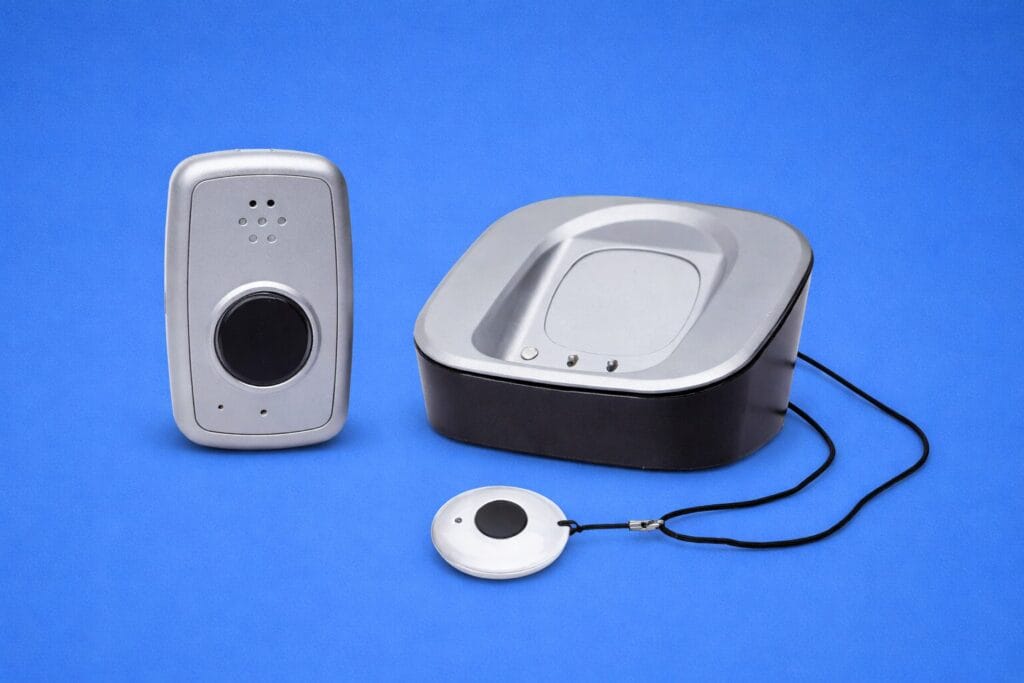
If your primary concern is getting reliable, professionally monitored protection without breaking the bank, MobileHelp is the clear winner. At $24.95 per month for their Classic Cellular in-home system—with no equipment fees, no activation charges, and no long-term contract—MobileHelp lets you get started for under $100 total. That’s meaningful for the roughly 40 percent of seniors over 65 who live primarily on Social Security income.
MobileHelp’s systems aren’t just affordable—they’re genuinely capable. The Classic Cellular system features a 1,400-foot range from the base station, the same industry-leading range that Medical Guardian touts for its more expensive MGHome Cellular. In independent response time tests, MobileHelp connected to live agents in an average of 17 to 26 seconds, right in line with the best performers. Consumer Reports rated MobileHelp as having the most reliable fall detection of any brand tested, making it a strong choice for seniors at high risk of falls.
For couples, MobileHelp offers standout value with its bundled systems. The Home Duo combines an in-home Classic Cellular system and a Micro mobile device for $44.95 per month—essentially giving two people full coverage for what many competitors charge for a single mobile system. The Mobile Duo provides two Micro devices for couples who are both active and frequently out of the house.
The main trade-off is polish. MobileHelp’s devices aren’t as sleek or modern-looking as Medical Guardian’s lineup, and the Solo mobile unit in particular is larger and heavier than those of competitors. The company also no longer offers a smartwatch option, so if a discreet wearable matters, you’ll need to look elsewhere. The caregiver portal (MobileHelp Connect) is functional but not as feature-rich as Medical Guardian’s app.
For families who need reliable emergency monitoring and fall detection without the sticker shock, MobileHelp delivers exceptional value. It’s the system we recommend for anyone who says, “I just need something that works and won’t cost a fortune.”
See MobileHelp on their website
Best for Couples and In-Home Satisfaction
#3. Bay Alarm Medical (from $27.95/mo)
Monthly Cost: $27.95–$64.95 (depending on system and add-ons)
Equipment Fee: $149 for mobile/smartwatch systems; none for in-home
System Types: In-home (landline and cellular), mobile GPS, smartwatch, On-the-Road vehicle system
Fall Detection: Optional; built into mobile devices or available as add-on pendant for in-home ($10/mo or $30 one-time)
Contract: No long-term contract; 15-day risk-free trial
Key Features: Free spousal monitoring, caregiver app, 360 bundles, multilingual support (170+ languages)
What we like:
Rated highest in overall customer satisfaction by Consumer Reports
Free spousal coverage—a second person uses the same system at no added monthly cost
Excellent 15-day risk-free trial to test the system before committing
Diverse product line including a unique On-the-Road vehicle alert system
What we don’t:
In-home base unit looks somewhat dated compared to competitors
Fall detection had mixed results in standing-position fall tests in independent reviews
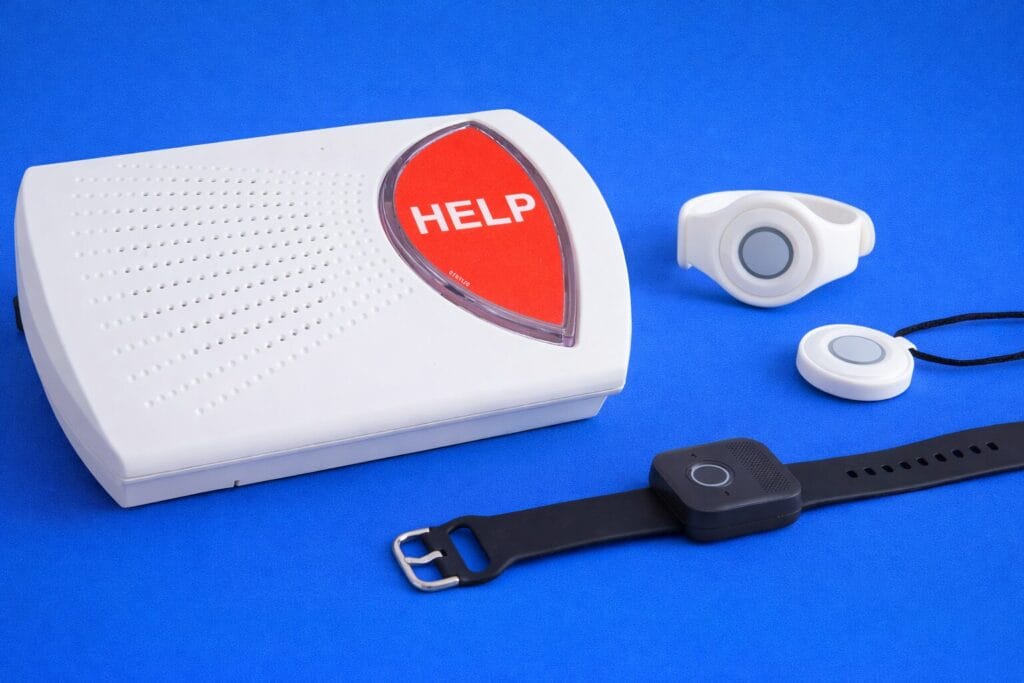
Bay Alarm Medical consistently earns the highest customer satisfaction scores in the industry, and it’s easy to see why. The company combines competitive pricing, no-nonsense service, and genuine flexibility, making the whole process of choosing and using a medical alert system feel less stressful. For couples in particular, Bay Alarm is hard to beat: when one person subscribes, their spouse or partner is covered at no extra charge—they just need their own help button pendant. Over a year, that can save hundreds of dollars compared to services that require separate accounts.
Bay Alarm’s product range has grown impressively. In addition to the standard in-home and mobile systems, the company now offers an SOS Smartwatch that looks and functions much like a consumer smartwatch, complete with step tracking and weather apps. They also offer a unique On-the-Road system designed specifically for in-vehicle use, featuring automatic crash detection—a feature no other major medical alert company currently offers.
The 15-day risk-free trial is another advantage over competitors like Medical Guardian, which offers no trial period. If your parent is sceptical about wearing a medical alert device, this trial removes the pressure and lets them experience the system before they commit financially. Bay Alarm’s customer service team is frequently praised in reviews for its patience and multilingual support, offering translation services in over 170 languages.
Where Bay Alarm trails slightly is in device aesthetics and fall detection consistency. The in-home base station, while perfectly functional, looks older than Medical Guardian’s sleeker units. More importantly, independent testing from Forbes found that Bay Alarm’s fall detection reliably caught seated slips but struggled with standing-position falls—a meaningful concern since many real-world falls happen from a standing position. Bay Alarm’s mobile GPS tracking and caregiver app, however, both performed well.
If you’re shopping for a couple, want a genuinely risk-free way to try a system, or simply prioritize customer service excellence, Bay Alarm Medical is the strongest choice. The free spousal coverage alone can justify choosing it over competitors with otherwise similar feature sets.
See Bay Alarm Medical on their website or on Amazon
Best Trusted Legacy System for Caregivers
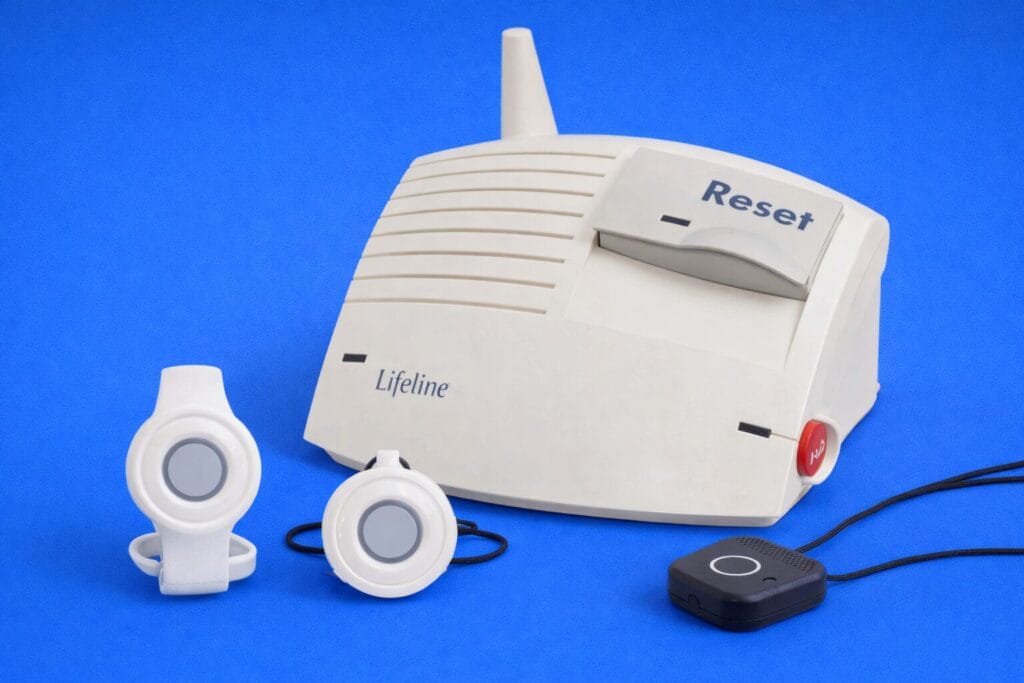
#4. Lifeline, formerly Philips Lifeline (from $29.95/mo)
Monthly Cost: $29.95–$49.95 (discounts with annual plans)
Equipment/Activation Fee: $99.95 one-time for most systems; $159 for smartwatch
System Types: In-home (landline and cellular), mobile GPS (On the Go), smartwatch
Fall Detection: Optional add-on, $15/mo
Contract: No long-term contract; cancel anytime
Key Features: My Lifeline caregiver app, professional installation option, multilingual support (140+ languages), automated medication dispenser
What we like:
Nearly 50 years of experience—the longest track record in the medical alert industry
Exceptionally fast response times, averaging around 12 seconds in independent tests
My Lifeline caregiver app provides real-time notifications, device status, and care coordination
Optional professional in-home installation for non-tech-savvy seniors
What we don’t:
One of the more expensive systems, especially with fall detection at $15/mo (vs. $10 industry average)
Up-front equipment and activation fees on all systems add to first-month cost
Lifeline—the system formerly branded as Philips Lifeline before its 2021 acquisition by Connect America—is the grand old name in medical alert systems, with roots stretching back to 1974. For families who value a proven track record and institutional reliability above all else, that half-century of experience carries real weight. Lifeline’s monitoring centers have served millions of subscribers, and the company’s systems are among the most widely used in assisted living and home care contexts nationwide.
In our research, Lifeline’s response times stood out as consistently among the fastest. Independent testing recorded an average connection time of approximately 12 seconds—significantly faster than the 60-second industry standard and notably quicker than Medical Guardian’s 20–29-second average. When a fall happens and your parent can’t get up, those extra seconds of speed matter enormously.
The My Lifeline caregiver app is thoughtfully designed for long-distance family care. It provides real-time notifications when the help button is pressed, lets caregivers check device status, and includes a care coordination feature for sharing notes with other family members involved in a parent’s care. For families managing a parent’s care across siblings in different states, this kind of digital coordination hub can reduce anxiety and miscommunication.
Lifeline also offers a unique $99 professional in-home installation, which is valuable for seniors who are nervous about setting up technology. While most competing systems are designed for self-installation, Lifeline recognizes that not every 80-year-old is comfortable following setup instructions. The company also offers an automated medication dispenser—a companion product that stores and dispenses medications on a programmed schedule—which no other medical alert company on our list provides.
The downside is price. Lifeline’s monthly rates start at $29.95, but the real premium shows in the add-ons: fall detection costs $15 per month (versus $10 at most competitors), every system requires a $99.95 activation fee, and shipping runs $29.95 unless you commit to an annual plan. A cellular in-home system with fall detection can cost over $55 per month when all fees are factored in. That’s roughly double what MobileHelp charges for comparable coverage. For families who can absorb the higher cost and prioritize brand trust and caregiver tools, Lifeline remains a solid choice—but budget-conscious buyers should look carefully at the total cost of ownership.
See Lifeline on their website
Best Smartwatch-Style Alert for Active Seniors
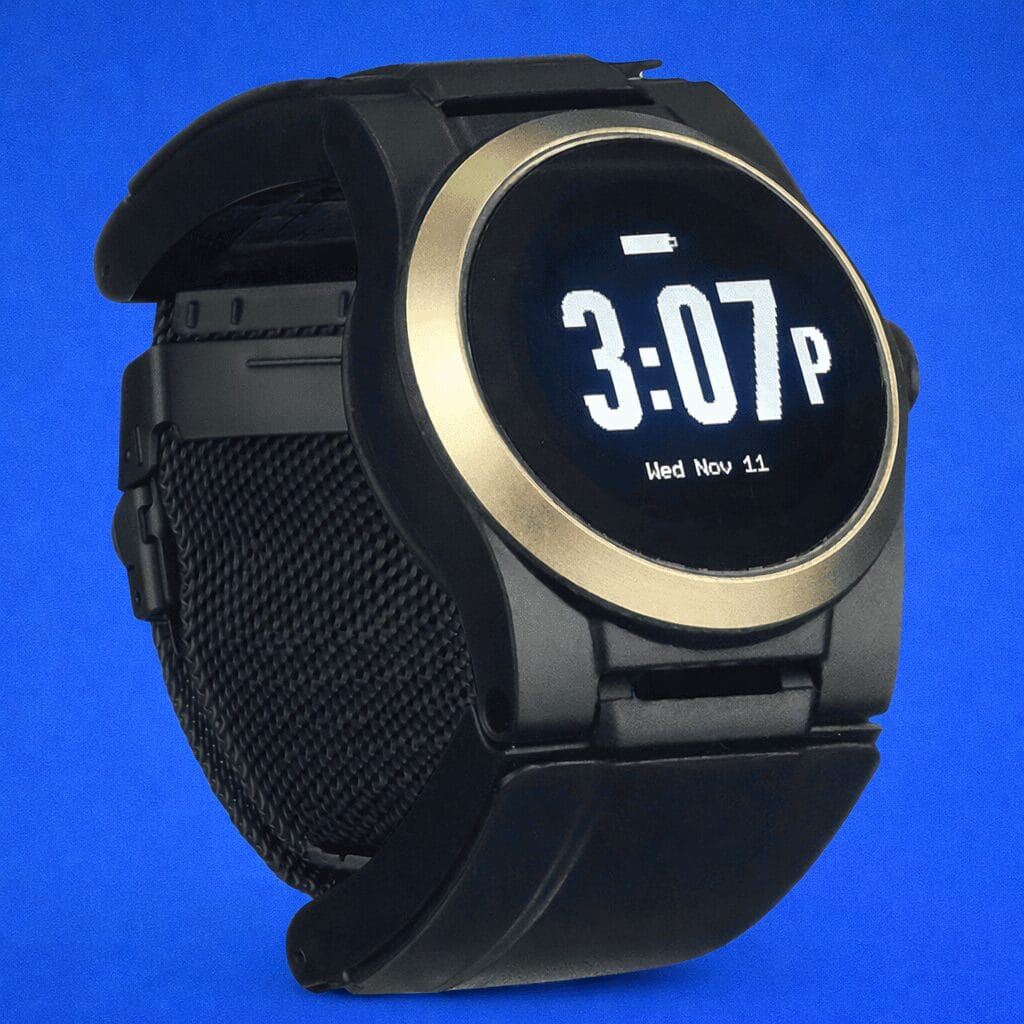
#5. UnaliWear Kanega Medical Alert Watch ($299 + $39.95/mo)
Device Price: $299 one-time purchase
Monthly Cost: $39.95 for monitoring
System Type: Smartwatch with built-in cellular, GPS, and fall detection
Fall Detection: Included at no extra cost (RealFall™ technology)
Contract: No long-term contract; cancel anytime with prorated refund
Key Features: Voice-activated alerts, waterproof, quick-swap rechargeable battery, lifetime warranty, safe for pacemakers
What we like:
Looks like a standard smartwatch—far more discreet than pendant-style devices
Fall detection included at no monthly surcharge, using proprietary RealFall™ technology
Can be worn in the shower and 24/7 thanks to a waterproof design and swappable batteries
Lifetime warranty for manufacturing defects; safe for use with pacemakers and ICDs
What we don’t:
Bulkier and heavier than it looks in photos—may not suit smaller wrists
No caregiver app for remote tracking and notifications
GPS accuracy can be unreliable without Wi-Fi connection
For seniors who resist wearing a traditional medical alert pendant because they find it stigmatizing or unattractive, the UnaliWear Kanega Watch offers a compelling alternative. It looks and wears like a smartwatch, complete with a watch face displaying the time, and it provides full medical alert functionality: a button and voice activation for emergency calls, built-in cellular connectivity, GPS tracking, and automatic fall detection—all in a device that sits on the wrist like any other watch.
The Kanega’s RealFall™ technology is a genuine differentiator. Unlike most fall detection add-ons that cost $10–15 per month extra, the Kanega includes fall detection at no additional charge. The system uses proprietary algorithms that learn the wearer’s typical movement patterns to reduce false alarms—a persistent problem with many fall detection systems. In independent testing, Forbes found only one false positive, and the watch reliably activated during actual fall simulations.
The waterproof design and swappable rechargeable batteries mean the watch can truly be worn around the clock, including in the shower. Spare batteries can be charged on the included cradle while the watch is being worn, so there’s no gap in protection while charging. The Kanega is also confirmed safe for use with pacemakers and implantable cardioverter-defibrillators (ICDs), which matters for the many seniors who have cardiac devices.
The downsides are real, though. At $299 for the device plus $39.95 per month for monitoring, the Kanega is the most expensive option on our list. The watch itself is larger and heavier than it appears in marketing photos—multiple reviewers noted it felt bulky on the wrist, and the plastic wristband can be uncomfortable, particularly for women or anyone with smaller wrists. Perhaps most significantly, the Kanega lacks a caregiver app, meaning family members cannot remotely track location or receive emergency notifications, as they can with Medical Guardian, Bay Alarm Medical, or Lifeline.
If your parent flatly refuses to wear a pendant or lanyard-style device—and aesthetics are a genuine dealbreaker—the Kanega Watch is the best smartwatch medical alert we’ve found. But if they’re open to wearing a small mobile device on a lanyard, the more affordable and better-connected options from Medical Guardian or Bay Alarm Medical will serve most families better.
See the UnaliWear Kanega Watch on their website
Buyer’s Guide: How to Choose the Right Medical Alert System for Seniors
Who Medical Alert Systems Are For
Medical alert systems were originally designed for older adults living alone who might fall and be unable to reach a phone. That remains the core use case, but today’s systems serve a much broader population. Adults recovering from surgery, people with chronic conditions like epilepsy or diabetes, individuals with mobility impairments, and even seniors who live with a spouse but worry about emergencies when the other person isn’t home all benefit from medical alert protection. The common thread is simple: if there’s a realistic chance that you or your loved one could need immediate help and might not be able to call 911 independently, a medical alert system is worth considering.
Caregivers and adult children are frequently the ones researching and purchasing these systems. If that’s you, the most important thing to internalize is that the system needs to work for your parent, not just satisfy your anxiety. A device that’s uncomfortable, confusing, or embarrassing to wear ends up in a drawer. Involve your parent in the decision, let them touch and try the device if possible, and respect their preferences about wearability and aesthetics. A system that’s worn every day provides infinitely more protection than a theoretically superior system that’s left on the nightstand.
Types of Medical Alert Systems Explained
Medical alert systems fall into three broad categories, and understanding the differences is essential before you start comparing brands.
In-home systems consist of a base station that plugs into your home and a wearable help button (pendant or wristband) that communicates wirelessly with the base. When you press the button, the base station connects you to the monitoring center via speakerphone. These systems only work within the base station’s range—typically 500 to 1,400 feet, depending on the system—so they’re designed for people who spend most of their time at home. In-home systems connect via either a landline phone connection or a built-in cellular radio. Landline systems are the cheapest option (often $20–25/month), but they require an active landline and won’t work during phone outages. Cellular in-home systems cost a bit more ($25–40/month) but work independently and include backup batteries for power outages.
Mobile or on-the-go systems are self-contained GPS devices that work anywhere with cellular service. They’re essentially a wearable cell phone with a single purpose: connecting you to emergency help. Mobile systems include a speaker, microphone, and GPS chip in the device itself, so the monitoring center can locate you even if you can’t describe where you are. These are ideal for active seniors who drive, walk, garden, travel, or simply don’t want to be tethered to a base station. Mobile devices typically cost $30–45/month and require regular charging (battery life ranges from 1 to 6 days, depending on the device).
Smartwatch systems are the newest category. These devices look and feel like consumer smartwatches but include medical alert functionality: an SOS button, two-way audio, GPS, and often fall detection. The primary advantage is discretion—many seniors resist traditional medical alert pendants because they feel stigmatizing, and a smartwatch eliminates that barrier. The trade-off is typically higher cost, shorter battery life, and a bulkier form factor compared to standard smartwatches.
Monitored vs. Unmonitored Systems
Most reputable medical alert systems are “monitored,” meaning your button press connects you to a live, trained dispatcher at a 24/7 monitoring center. The dispatcher assesses the situation through two-way audio, contacts your designated emergency contacts, and dispatches local emergency services if needed. This human layer is critical because many seniors in crisis cannot effectively communicate with 911 operators or may not need an ambulance, but do need someone notified.
Unmonitored or “self-monitored” systems skip the monitoring center and instead call 911 directly or send text alerts to family members. These are typically cheaper (no monthly fee), but they sacrifice the professional assessment layer. If your parent accidentally presses the button, there’s no dispatcher to cancel the false alarm before the police arrive. If your parent falls and can’t speak, there’s no trained agent to listen and dispatch help. For these reasons, we strongly recommend monitored systems for most seniors, despite the monthly cost.
Understanding Fall Detection: What It Can and Cannot Do
Fall detection is arguably the single most important feature to evaluate, and also the most misunderstood. Automatic fall detection uses sensors (typically accelerometers and sometimes gyroscopes) in the device to detect sudden changes in motion and orientation consistent with a fall. When a fall is detected, the system automatically contacts the monitoring center—even if the wearer is unconscious or too disoriented to press the button.
Here’s what every buyer needs to understand: no fall detection system catches 100 percent of falls. Different types of falls (forward, backwards, seated slips, slow collapses) produce different motion signatures, and devices vary in which types they reliably detect. In independent testing, some systems caught all simulated falls while others missed standing-position falls entirely. This is why fall detection should be viewed as an additional safety net, not a replacement for pressing the button when possible.
Fall detection also comes with the trade-off of false alarms. Dropping a device, bending over sharply, or sitting down hard can sometimes trigger false alerts. Consumer Reports found that MobileHelp had the most reliable fall detection among brands tested, but was also the most prone to accidental activations. The UnaliWear Kanega’s RealFall™ technology addresses this by learning the wearer’s movement patterns over time, potentially reducing false positives.
Most companies charge $10–15 per month extra for fall detection. Given that one in four adults over 65 falls each year, and that the risk doubles after the first fall, we consider fall detection worth the investment for anyone with balance issues, a history of falls, mobility impairments, or conditions like osteoporosis that make falls especially dangerous. If budget is extremely tight, prioritize fall detection on mobile devices used outside the home, where a fall might occur without anyone nearby to help.
Landline vs. Cellular Connections
In-home medical alert systems connect to the monitoring center through either a traditional landline phone connection or a built-in cellular radio. Landline systems are the cheapest option—typically $5–10 less per month than cellular equivalents. However, they require an active landline phone service in the home, and they stop working if the phone line goes down during the same storm or power event that might cause a fall.
Cellular systems work independently of any phone line and include built-in backup batteries, so they continue functioning during power outages (typically for 24–32 hours). The vast majority of medical alert systems today use either AT&T or Verizon’s 4G LTE networks. Before purchasing, verify that the carrier used by your chosen system has strong coverage at your parent’s address. Medical Guardian, Lifeline, and MobileHelp use AT&T; Bay Alarm Medical’s mobile systems now use Verizon. A system is only as reliable as the cellular signal it depends on.
Wearability, Comfort, and Getting Your Parent to Actually Wear It
The most sophisticated medical alert system in the world provides zero protection if it sits unworn on a nightstand. This is the single biggest real-world challenge with medical alert systems, and it’s one that technical reviews often underemphasize. Many seniors resist wearing a visible medical device because it feels like an admission of vulnerability.
Here are practical strategies that work. First, involve your parent in choosing the device—give them agency over the style, color, and wearing method. Many systems offer both pendant and wristband options, and some companies, like Bay Alarm Medical, offer customizable accessories to personalise the look. Second, if stigma is a major concern, consider a smartwatch. The Medical Guardian MGMove and Bay Alarm’s SOS Smartwatch both look like standard smartwatches and offer step tracking that normalizes wearing the device. Third, emphasize that the device is water-resistant and should be worn in the shower—the bathroom is where the majority of senior falls occur, and wearing the device during bathing is non-negotiable for real protection.
Comfort matters too. Heavier devices cause skin irritation over time, especially on aging skin. If your parent has thin or fragile skin, pay attention to band material and weight. When possible, use a trial period to test wearability before committing.
Caregiver Features: What to Look For
If you’re an adult child living in a different household from your parent, caregiver features become extremely important. The best systems offer dedicated mobile apps that let you monitor your parents’ devices remotely. Key features to look for include real-time GPS location tracking, emergency call notifications, device battery monitoring, and emergency call history logging.
Medical Guardian’s MyGuardian app is currently the most comprehensive, offering all of the above plus medication reminders and the ability to build a detailed emergency plan. Bay Alarm Medical’s app covers location tracking, battery monitoring, and call notifications. Lifeline’s My Lifeline app emphasizes care coordination, letting multiple family members share notes and updates. MobileHelp’s caregiver portal provides basic alerts and system status. The UnaliWear Kanega Watch has no caregiver app at all, which is a significant gap for families doing long-distance caregiving.
Pricing: Understanding the True Cost
Medical alert pricing can be deceptively complex. The advertised monthly rate is just the starting point. Here are the cost layers you need to account for when comparing systems.
Monthly monitoring fees are the core recurring cost, ranging from about $20 to $50 per month depending on the system type and provider. In-home systems are always cheaper than mobile systems. Annual or quarterly payment plans typically offer 5–15 percent savings over month-to-month billing, plus perks like free shipping or a free lockbox.
Equipment fees are one-time charges for the hardware. MobileHelp and some Bay Alarm in-home systems charge no equipment fee (the devices are leased). Medical Guardian charges $149–$199. Lifeline charges $99–$159. The UnaliWear Kanega Watch costs $299 outright.
Fall detection is almost always an add-on, typically $10–15/month. The exception is the UnaliWear Kanega, which includes it for free. Over a year, fall detection adds $120–$180 to your total cost.
Activation and shipping fees vary widely. MobileHelp charges neither. Lifeline charges $99.95 activation and $29.95 shipping (waived with annual plans). Medical Guardian charges $12.50 for shipping (free with annual). Bay Alarm charges no activation fee.
To accurately compare systems, calculate the total first-year cost, including all fees, not just the monthly rate. A system advertised at $24.95/month with no fees is genuinely cheaper than one advertised at $29.95/month with a $99 equipment fee, a $50 activation fee, and $15/month fall detection.
Home Use vs. Travel Use
For seniors who rarely leave home, an in-home system is sufficient and will save money. But be realistic about your parents’ actual routine. Do they garden? Walk to the mailbox? Visit neighbors? Drive to church or medical appointments? Any regular activity outside the home’s base station range warrants a mobile system or at minimum a bundle that includes both.
For seniors who travel—even occasionally—a mobile GPS system is essential. Medical alert systems that use cellular networks work throughout the coverage area of that network, so a mobile device will function in another state just as well as at home, as long as there’s cellular service. If your parent splits time between two homes (a common scenario for snowbirds), a mobile system avoids the need for two separate in-home setups.
Common Mistakes to Avoid
Buying a medical alert system for the first time comes with a learning curve, and certain mistakes are surprisingly common. The most common error is purchasing a system based solely on the lowest advertised monthly rate, without accounting for equipment fees, activation charges, and fall detection costs. The total first-year cost is the only meaningful comparison.
Another common mistake is choosing a landline system without verifying that the landline is consistently functional. Many seniors have landlines they rarely use, and an intermittent connection can prevent the system from reaching the monitoring center during an emergency. If there’s any doubt about landline reliability, go cellular.
Families also frequently overlook the importance of regularly testing the system. Most providers recommend pressing the button for a test call at least once a month to confirm the system is working and the monitoring center has current information on file. It takes 30 seconds and can surface connection problems before they become a problem.
Finally, be cautious about aggressive sales tactics. Some medical alert companies use high-pressure phone sales, automatic enrollment, or misleading “free device” offers that lock customers into multi-year contracts. Every system on our list uses transparent online purchasing with no long-term contracts, but the broader market includes less reputable players. If a company pressures you to commit immediately or won’t clearly explain all fees in writing, walk away.
Does Medicare or Insurance Cover Medical Alert Systems?
Standard Medicare (Parts A and B) does not cover medical alert systems. However, some Medicare Advantage (Part C) plans do include coverage for medical alert services as a supplemental benefit. If your parent has a Medicare Advantage plan, call the plan directly to ask whether personal emergency response systems are covered. Some Medicaid programs also cover medical alert systems under home- and community-based services waiver programs, depending on the state. Additionally, some long-term care insurance policies and Veterans Affairs programs may provide partial coverage.
All of the systems on our list are eligible for HSA (Health Savings Account) and FSA (Flexible Spending Account) reimbursement, which can offset costs with pre-tax dollars.
How Caregivers Should Think About This Purchase
As a caregiver or adult child, your instinct is often to buy the most protective, most feature-rich system available. That’s understandable—your parents’ safety is the priority. But the best system is the one your parent will actually use consistently, and that may not be the most technically sophisticated option.
Start by honestly assessing your parents’ daily routine, physical capabilities, and willingness to wear a device. A parent with severe arthritis may struggle with a small button; one with hearing loss needs a system with loud, clear two-way audio. A parent who is embarrassed by ageing may prefer a smartwatch to a pendant. A parent who never leaves the house doesn’t need a $45/month mobile system. Match the system to the person, not to your worst-case fears.
Also consider the ongoing management burden. Who will handle billing? Who will remind your parents to charge the device? Who will troubleshoot if the base station loses connection? If you live nearby, these tasks are manageable. If you live far away, a caregiver app with battery monitoring and activity alerts becomes much more valuable.
Finally, have a direct and compassionate conversation with your parent about why this matters. Frame it not as a loss of independence but as a tool that supports their independence. Many seniors who initially resist medical alert systems come to appreciate the peace of mind they provide—not just for their families, but for themselves.
Final Thoughts
The best medical alert system for your family depends on where your parent lives, how active they are, what they’re willing to wear, and what you can comfortably spend. For most families, Medical Guardian offers the strongest overall package—fast response times, the widest device selection, and the best caregiver app in the business. For budget-conscious families, MobileHelp delivers genuinely reliable protection at the lowest price with no hidden fees. Bay Alarm Medical is the clear winner for couples thanks to free spousal coverage and the highest customer satisfaction scores, while Lifeline’s nearly 50-year reputation and blazing-fast response times make it a solid choice for families who prioritize proven reliability. And for seniors who refuse to wear anything that looks like a medical device, the UnaliWear Kanega Watch offers a discreet smartwatch alternative with excellent fall detection.
No matter which system you choose, the most important thing is to actually get one in place. According to the CDC, one in four adults over 65 falls each year, and studies show that seniors who lie on the floor for more than an hour after a fall are at dramatically higher risk of worse outcomes. A medical alert system costs less than a dollar a day and can be the difference between a minor scare and a life-altering event. Choose a system, use the trial period, make sure your parent wears it consistently—and give both of you the peace of mind you deserve.
Sources
https://www.ncoa.org/product-resources/medical-alert-systems/best-medical-alert-systems
https://www.consumerreports.org/health/medical-alert-systems/best-medical-alert-systems-a1136054281
https://www.nytimes.com/wirecutter/reviews/the-best-medical-alert-systems
https://www.forbes.com/health/medical-alert-systems/best-medical-alert-bracelets
https://www.aarp.org/caregiving/home-care/medic-alert-systems-options
https://realestate.usnews.com/home-services/medical-alert-system/medical-guardian
https://realestate.usnews.com/home-services/medical-alert-system/mobilehelp
https://realestate.usnews.com/home-services/medical-alert-system/lifeline
https://www.seniorliving.org/medical-alert-systems/medical-guardian/reviews
https://www.seniorliving.org/medical-alert-systems/bay-alarm-medical/reviews
https://www.seniorliving.org/medical-alert-systems/mobilehelp/reviews
https://www.seniorliving.org/medical-alert-systems/philips-lifeline/reviews
https://www.seniorliving.org/medical-alert-systems/kanega-watch
https://www.safehome.org/medical-alert-systems/medical-guardian/reviews
https://www.safehome.org/medical-alert-systems/bay-alarm-medical
https://www.safehome.org/medical-alert-systems/mobilehelp
https://www.theseniorlist.com/medical-alert-systems/philips-lifeline/reviews


